Ideas planted today are built into tomorrow's services.
SnapSlide Puzzle Game
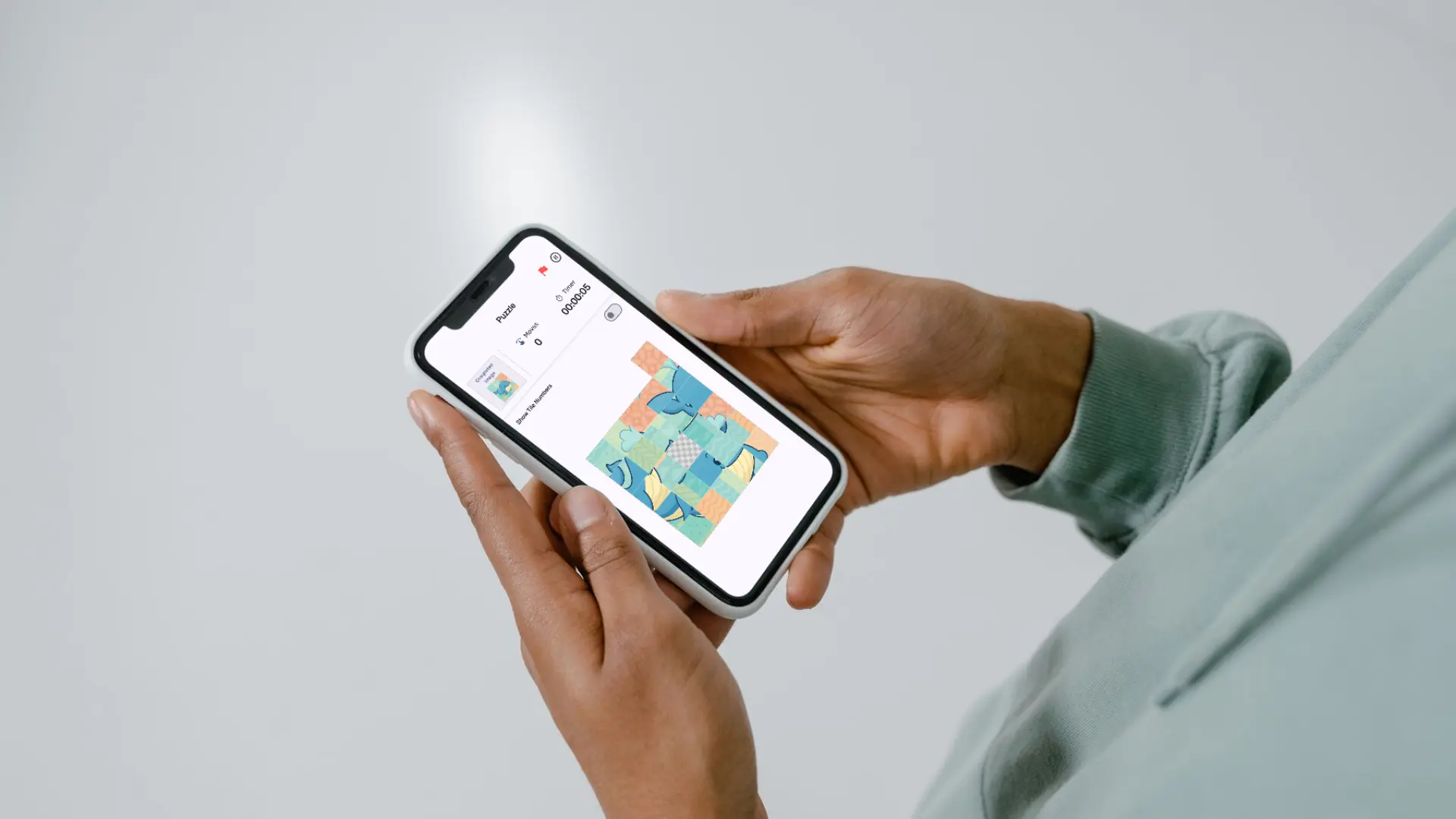
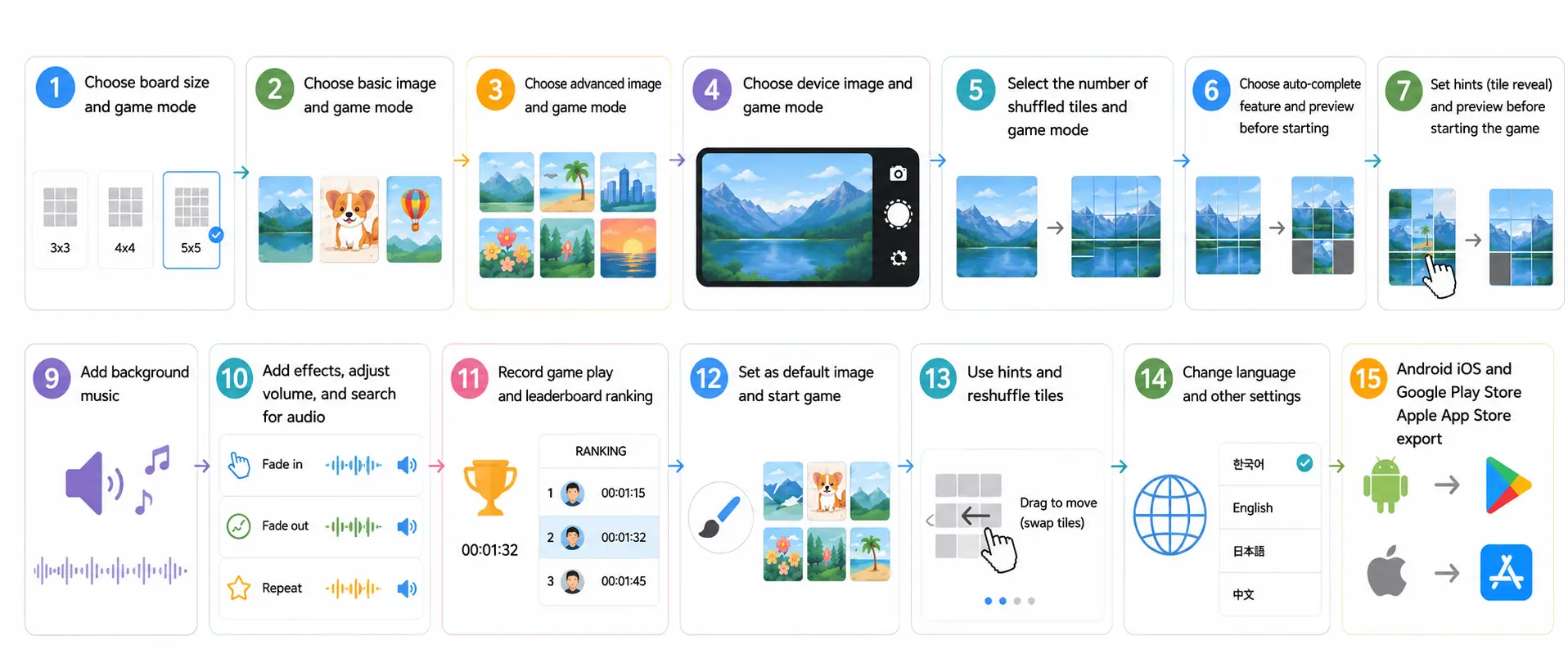
A mobile sliding puzzle app that divides an image into tiles and lets users move those tiles using an empty space to complete the original image. In addition to built-in images, the app is designed so that photos taken with the camera and images from the smartphone gallery can also be turned into puzzles.
Follow
0
Overview
"SnapSlide Puzzle Game" is a sliding puzzle app where users select an image, divide the selected image into puzzle tiles, and use an empty space to restore it to the original image.
The app was planned to support a wide range of grid sizes from 2×2 to 10×10. Lower difficulty levels allow for light, casual play, while higher difficulty levels provide more complex puzzles. It also allows users to create puzzles not only from built-in images provided by the app, but also from photos they take themselves or images saved on their smartphones.
What I wanted to examine through this project was implementing a puzzle game with Flutter, the efficiency and limitations of vibe coding using Cursor, and the advertising effectiveness of Google Ads.
Main image
Participants
Name
Organization
Role
JaeKyeong Sim
—
Developer
Period
2025-05-01 – 2025-07-15
Technologies Used
FlutterUsed to develop a mobile app that supports both Android and iOS
Google AdMobApplying advertisements inside the app
Links
Background
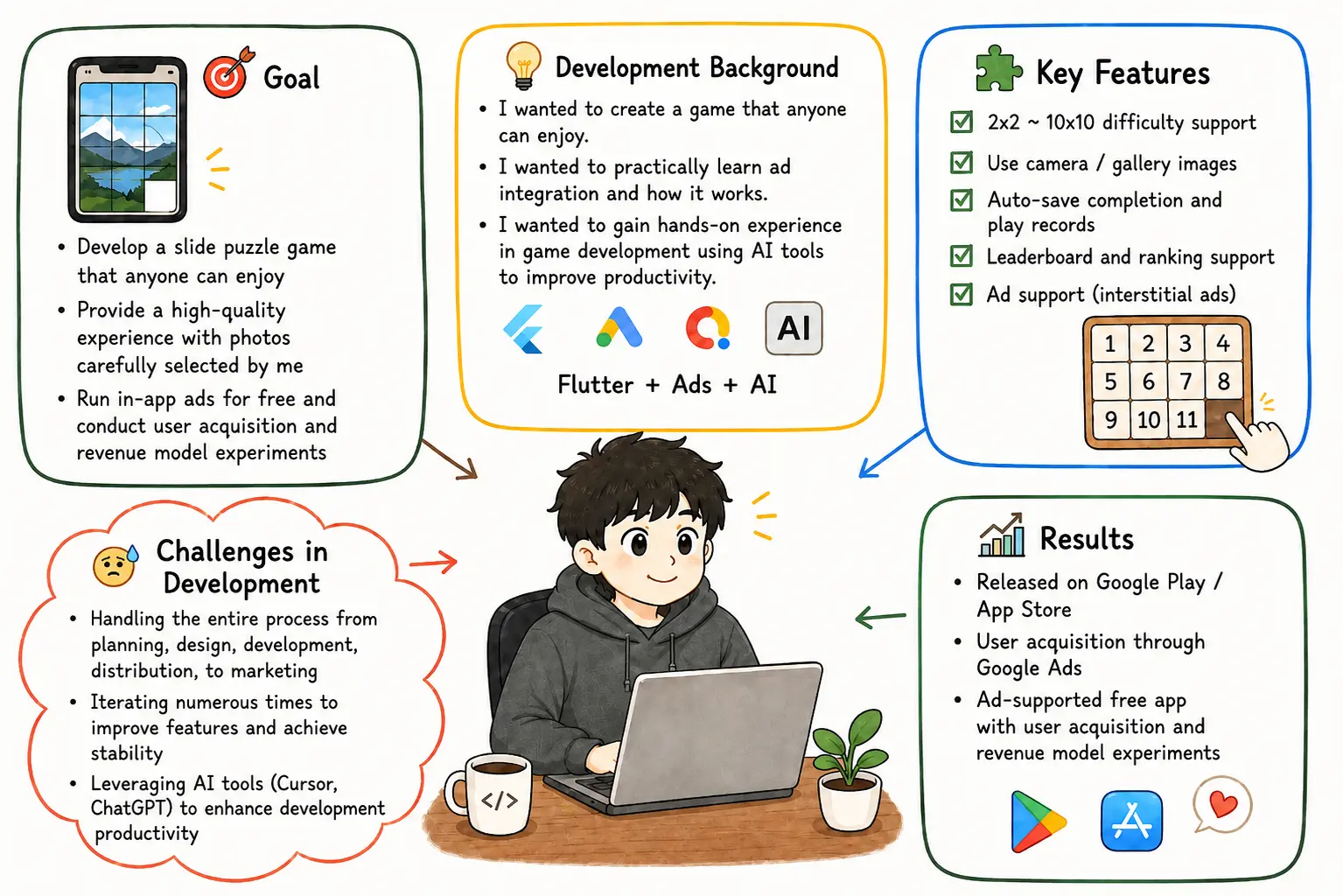
Through my previous projects, "CheerUp Mini" and "TallyCounter — Tap to Count", I had gained some experience with Flutter app development and the store release process. So in this project, I wanted to go beyond simply asking, "Can I release an app?" and find out whether I could build a game-style app more quickly and expose it to real users.
A sliding puzzle is a game with clear rules. The user moves tiles based on the empty space and restores the shuffled image to its original state. At first glance, it looks like a simple puzzle game, but from an implementation perspective, it involved more elements than a static-screen app. I needed to implement multiple features together, including image selection, image slicing, difficulty-based board generation, determining whether a tile can move, completion detection, auto-completion, record saving, and leaderboard display.
I chose this project for the following reasons.
Goal
Reason
Implement a Flutter game app
To check user response with a game app that has a relatively low installation barrier when exposed to an unspecified audience through advertising
Store release and advertising experiment
To release the completed app on Android and iOS and create user acquisition through advertising
Vibe coding development experiment
To see whether Cursor could help increase development speed
In early 2025, the expression "vibe coding," which refers to using AI tools to describe desired results in natural language and generate code, began receiving attention. Merriam-Webster explains that the term originated from a post Andrej Karpathy made on X on February 2, 2025. In this project, I also examined how effective AI-assisted development using Cursor could be in an actual app development process [Merriam-Webster - Vibe Coding].
Background and Goal
Key Features
Sliding puzzle gameplay
The core puzzle feature where users move tiles using the empty space to complete the image
2×2 ~ 10×10 difficulty levels
Provides board sizes ranging from easy levels to complex difficulty levels
Auto-completion
A feature that visually shows the puzzle being completed by automatically replaying tile movements when the user stops or gives up on the puzzle
Built-in images
Allows users to select built-in images included in the app and immediately play them as puzzles
Camera image support
Converts photos taken directly by the user into puzzle images
Gallery image support
Converts images saved on the smartphone into puzzles
Play record saving
Saves puzzle completion records so users can review their own play results
Leaderboard
Displays saved records in ranking format so users can compare play results
Multilingual support
Supports multiple languages with global release in mind
In-app advertising
Experiments with a free-app advertising revenue model using Google AdMob
Development
Setting Development Goals
The development goals of "SnapSlide Puzzle Game" were to develop a game app with Flutter, release it on Android and iOS, run Google Ads for global users, and experience vibe coding.
While my previous projects focused on learning Flutter app development and the store release process, this project aimed to examine user acquisition after release as well. The important goal was not simply to complete the app, but to register it on real app stores, expose it to an unspecified audience through advertising, and check whether downloads would occur.
I defined the feature scope around a game app that even users encountering it for the first time through an ad could easily understand and play. I first implemented the core sliding puzzle requirements, such as puzzle board generation, tile movement, and completion detection. Then I added camera and gallery image selection, auto-completion, record saving, leaderboard, advertising, and multilingual support.
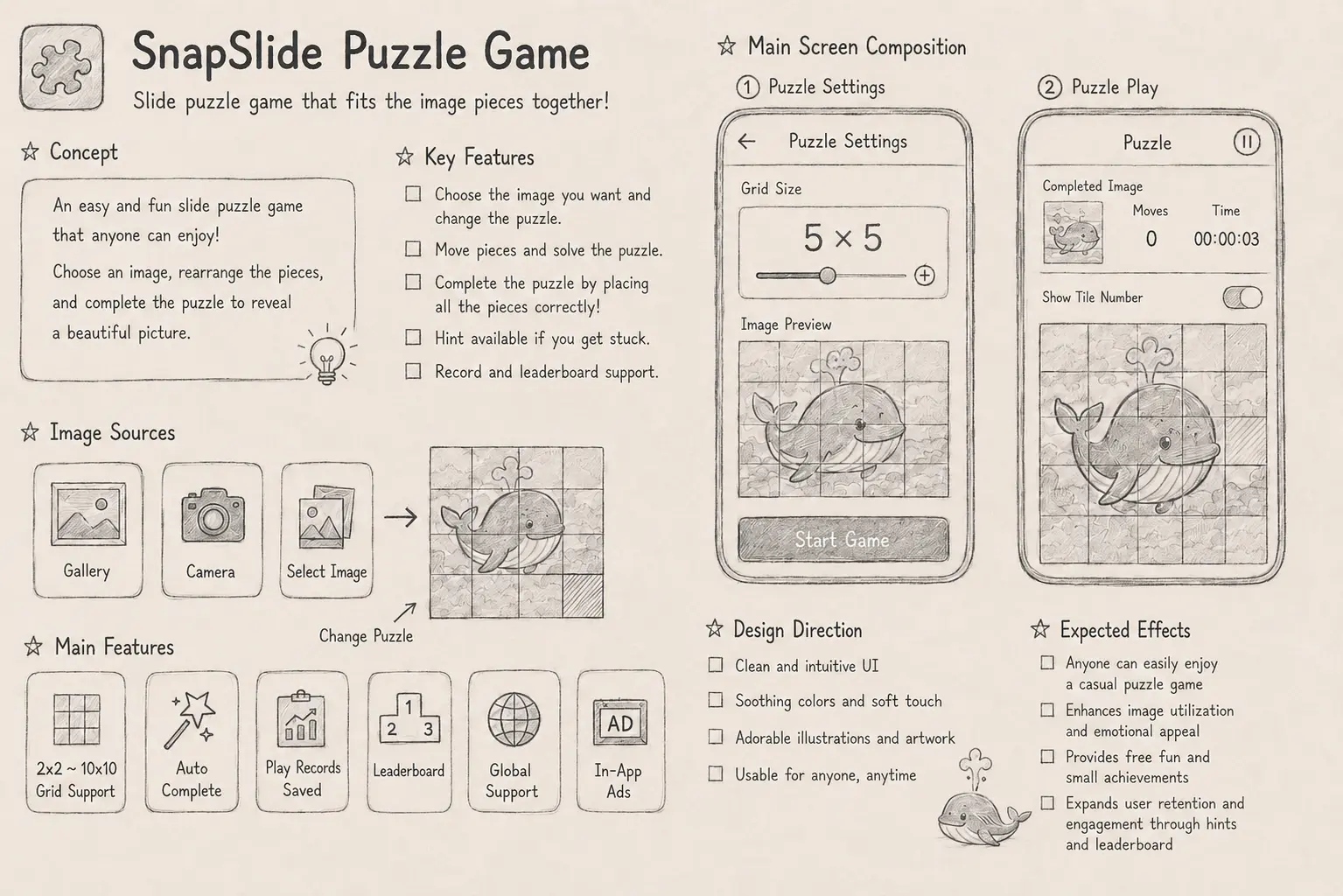
Concept for SnapSlide Puzzle Game
System Architecture
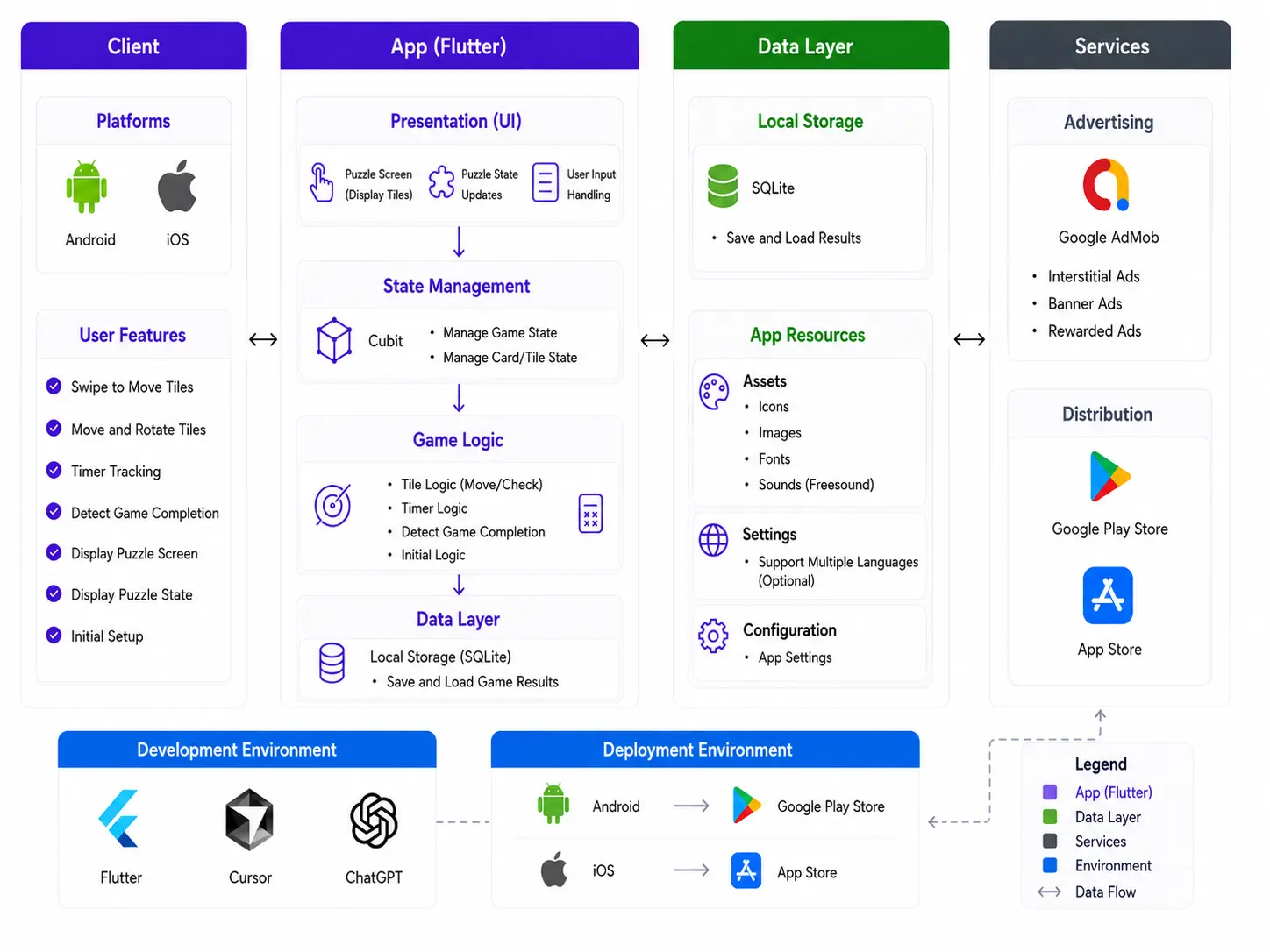
"SnapSlide Puzzle Game" was built as a mobile app that works without a separate server. Image selection, puzzle generation, puzzle shuffling, game state management, auto-completion, record saving, and ad display all take place inside the app. In particular, the puzzle was designed not by placing tiles randomly, but by repeatedly moving movable tiles around the empty space to create a state that can actually be solved.
Component
Role
Image input module
Selects built-in images, camera-captured images, and gallery images as the original puzzle image
Puzzle generation logic
Divides the selected image into N×N tiles according to the difficulty level and constructs the puzzle board
Puzzle shuffling logic
Shuffles the puzzle by repeatedly selecting and moving one of the tiles adjacent to the empty space at random
Game state management
Manages current tile positions, empty-space position, movable status, move history, and completion status
Tile movement handling
If the tile selected by the user is adjacent to the empty space, swaps their positions and updates the current puzzle state
Completion detection logic
Checks whether the current tile arrangement matches the correct arrangement
Auto-completion logic
Automatically shows the completion process based on the current puzzle state when the user gives up on the puzzle
Record saving module
Saves puzzle completion records and play results
Leaderboard screen
Displays saved records in ranking format
Advertising module
Displays Google AdMob ads on app screens
Multilingual resources
Manages app text for each supported language
System Architecture Diagram
Core Implementation Flow
Implementation Flow
Image-Based Puzzle Generation Logic
The core of this app was dividing a single image according to the puzzle board size. When the user selects the 3×3 difficulty level, the image is divided into 9 areas; when the user selects the 5×5 difficulty level, the image is divided into 25 areas. Each tile displays a specific area of the original image, and the user moves the tiles in the shuffled puzzle to return them to the original order.
To support user images, I designed the app to process not only built-in images but also camera-captured images and gallery images through the same puzzle generation flow. In other words, even if the image source differs, it is ultimately converted into the original puzzle image and then passed through the same tile-splitting logic.
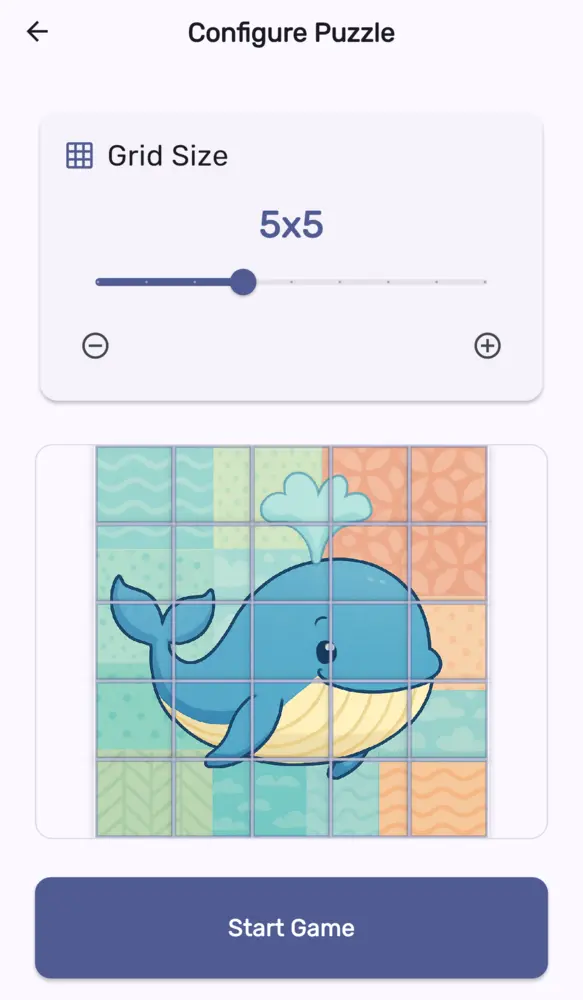
Tile size and quantity selection screen
Puzzle Shuffling Logic
Puzzle shuffling was implemented by starting from the completed puzzle state and moving tiles within the actual gameplay rules. The app randomly selected one of the tiles adjacent to the empty space and moved the selected tile into the empty space, repeating this process to shuffle the puzzle.
This approach is safer than simply randomizing the tile array. In a sliding puzzle, certain tile arrangements can create unsolvable states. Therefore, instead of directly generating a random arrangement, I designed the puzzle to repeat only valid moves from the completed state. This ensures that the shuffled puzzle is still in a state that users can solve again by following the actual movement rules.
During the shuffling process, the app calculates the list of movable tiles based on the current position of the empty space and randomly selects one of them. When a tile moves, the empty-space position and the overall tile array are updated, and this process is repeated a number of times appropriate for the difficulty level. This made it possible to shuffle simple 2×2 puzzles and complex 10×10 puzzles using the same structure.
Puzzle State Management and Completion Detection
In a sliding puzzle, not every tile can move freely. Only tiles adjacent to the empty space should be movable. Therefore, the app manages each tile's current position and the empty-space position, and when the user selects a tile, it first determines whether that tile is movable.
When a tile moves, the current board state is updated, and the app checks whether the current tile arrangement matches the correct arrangement. When all tiles return to their original positions, the puzzle is treated as completed, and the completion record can be saved.
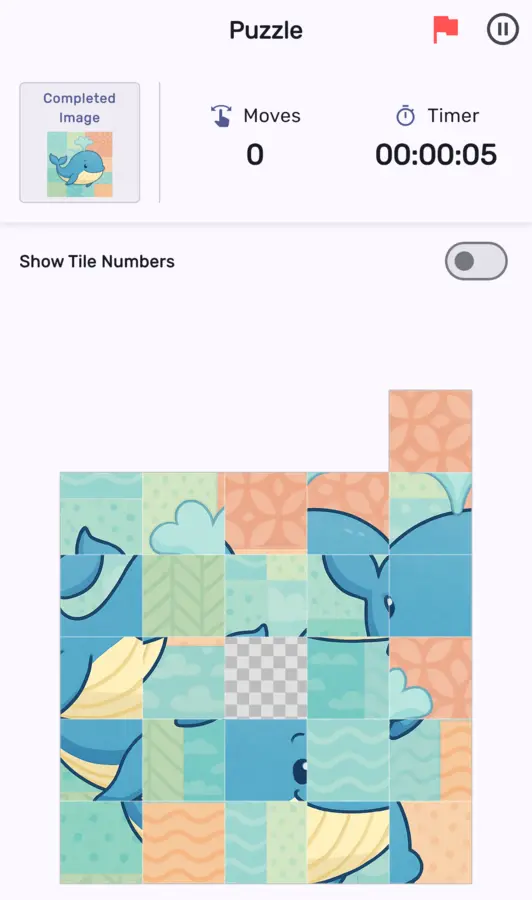
Play screen
Auto-Completion Logic
The auto-completion feature was implemented to visually show the puzzle being completed when the user gives up. Instead of immediately changing the puzzle state to the solved state, it shows the tiles moving one by one until the puzzle is completed.
The auto-completion method was handled differently depending on the puzzle size. For puzzles with fewer tiles, the app shows a process in which the puzzle is solved with a near-optimal number of moves. Because small puzzles have a relatively small state space, it was possible to calculate and display a movement path from the current state to the solved state.
On the other hand, calculating the optimal path was not suitable for puzzles with many tiles. As the board size grows, the number of possible states increases rapidly, so calculating every case to find the optimal path could become a performance burden. Therefore, for larger puzzles, I implemented auto-completion by replaying the move history recorded during shuffling in reverse. Since the puzzle is shuffled from the completed state through random moves, following that move history backward returns it to the completed state.
During reverse playback, I also applied processing to remove repeated section patterns. If the same puzzle state appears again, the moves between those two identical states are ultimately an unnecessary section that returns the puzzle to its previous state. Therefore, when the same state appears again, the moves in between are omitted. This reduces unnecessary back-and-forth movements or repeated motions during auto-completion and creates a more natural completion flow for users to watch.
Cursor-Based Vibe Coding
In this project, I experimented with using Cursor to increase development speed. AI-assisted development helped improve speed when creating the initial screens, drafting basic logic, and exploring directions for fixing errors. In particular, I could quickly create prototypes by describing the features to implement in natural language and reviewing the generated code.
However, for features where detailed behavior was important, such as puzzle tile movement and animation handling, AI sometimes failed to produce accurate results in one attempt. As more features were added, the connections between pieces of code became more complex, and there were cases where modifying one part broke another feature. In the end, rather than using AI-generated code as-is, I needed to directly verify the behavior and provide more specific directions for revisions.
Stack Overflow's 2024 Developer Survey also showed that while the effect developers most expected from AI tools was increased productivity, only about 43% of respondents said they trusted the accuracy of AI results, and 45% of professional developers said AI tools were not good at handling complex tasks. My experience in this project was similar. AI helped speed up early implementation, but complex logic and quality control still needed to be reviewed directly by the developer. [Stack Overflow - 2024 Developer Survey, AI]
Store Release
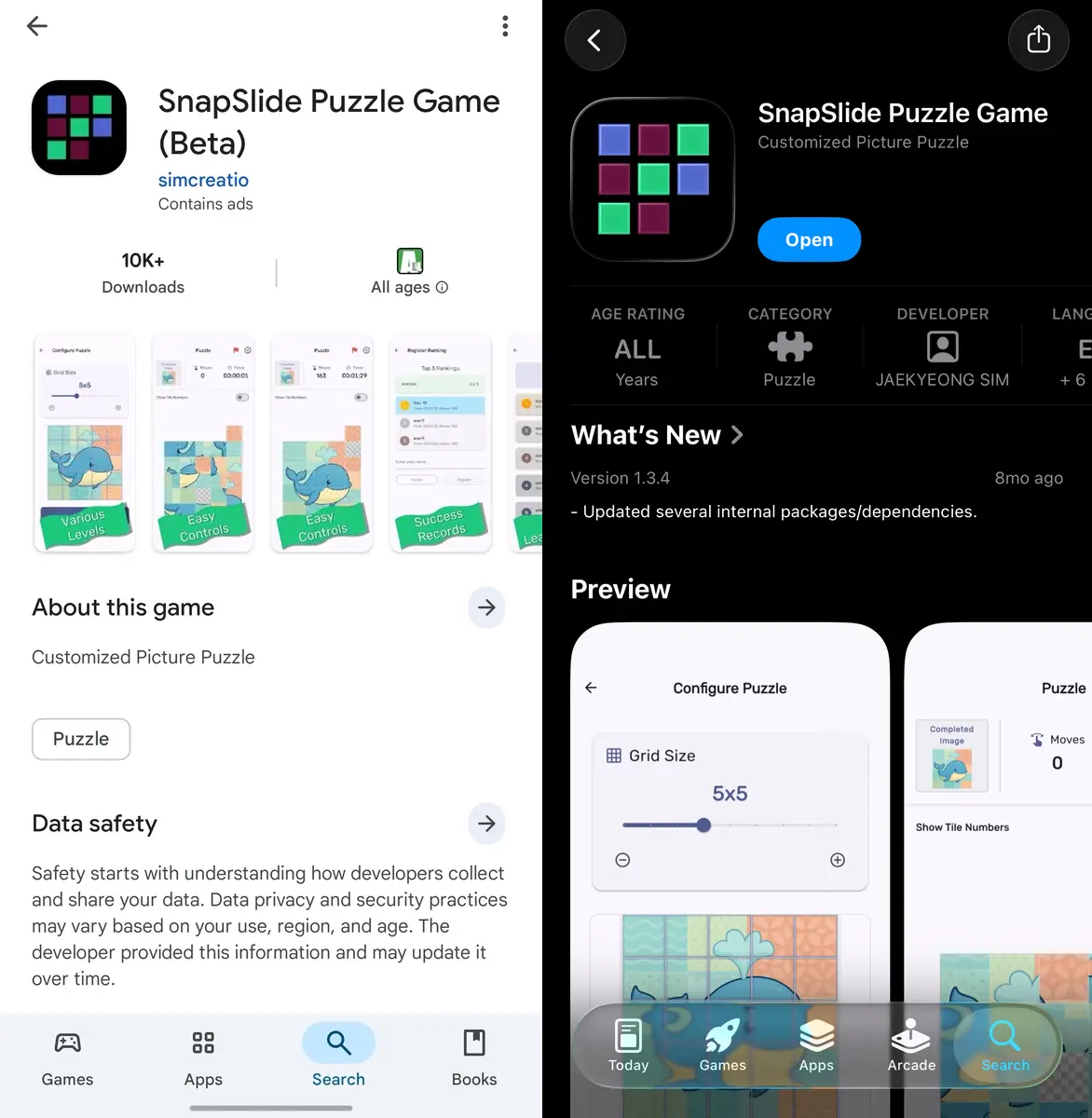
[Left Image]: Appearance on Google Play Store, [Right Image]: Appearance on Apple App Store
Achievements
Developed a sliding puzzle game app with Flutter
Success
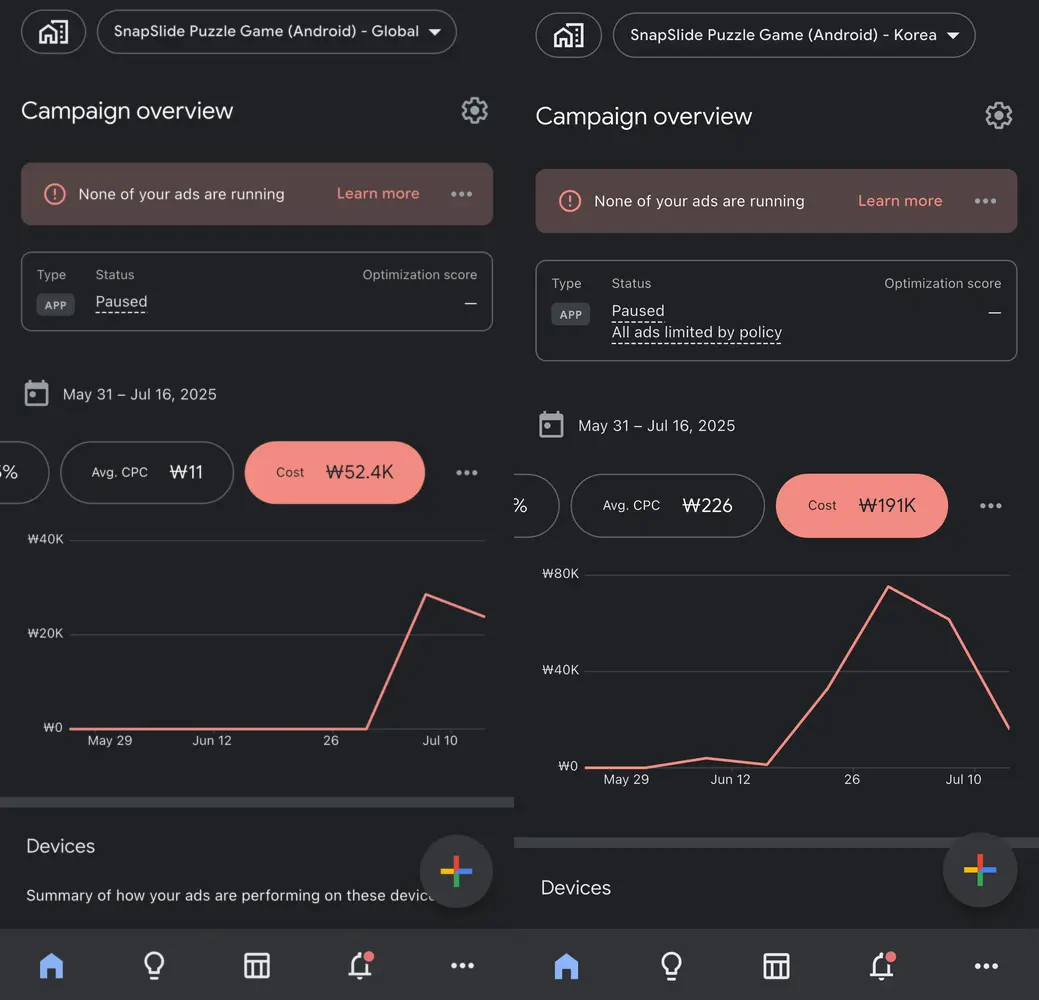
Ran global advertising using Google Ads
Success
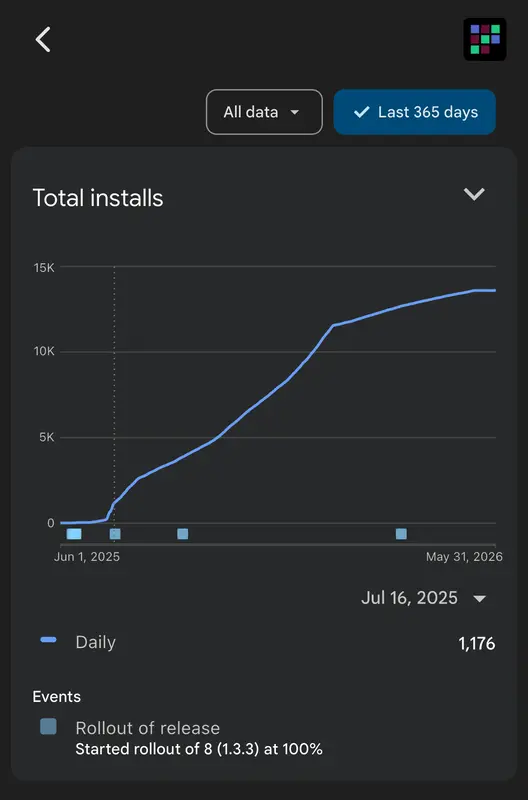
Surpassed 1,000 downloads
Success
Developed an app using vibe coding
Success
The purpose of this project was not simply to develop a game app with Flutter, but to release the completed app on Android and iOS and expose it to global users through Google Ads.
From that perspective, this was a project that continued through development, release, and advertising execution. In particular, the most important result was that the app surpassed 1,000 downloads after spending about 250,000 KRW on advertising.
However, the result of reaching 1,000 downloads cannot immediately be considered validation of business potential. Since free apps have a low installation barrier, it cannot be assumed that download counts will lead to sustained usage, paid conversion, or profitability. Therefore, the achievement of this project lies in the fact that "it was possible to generate downloads for a free app through advertising," while the remaining task is to examine post-download retention and conversion metrics.
[Left Image]: Global ad spending via Google Ads, [Right Image]: Korean ad spending via Google AdsChanges in installation count on Google's Play Store
Lessons Learned from the Project
In this project, I developed the app using vibe coding with Cursor. In the early stages, the basic screens and major features were created quickly, but as the work moved toward small bug fixes and detailed feature adjustments, the requirements were often not resolved in one attempt.
This problem occurred more frequently as the project's codebase grew. AI-generated code sometimes did not fit the existing structure, or modifying one part affected other features.
After this, I decided not to continue adding features simply through vibe coding, but to apply a process of directly reviewing and analyzing AI-generated results before continuing to the next task.