Ideas planted today are built into tomorrow's services.
TallyCounter — Tap to Count
A mobile tally counter app that lets users count by tapping the screen, decrease the number when needed, reset it, or change it manually. Instead of adding complex features, this project focused on fast development and real store-release validation, and it was created to recheck the Google Play release issue encountered in the first app.
Follow
0
Overview
"TallyCounter — Tap to Count" is a mobile tally counter app that increases the number by 1 whenever the user taps the screen.
Users can increase the number by touching the screen, decrease it with a button, reset it to 0, or manually change it to any number they want. I designed it as a lightweight utility app for situations where numbers need to be recorded quickly, such as simple quantity counting, tracking workout repetitions, keeping game scores, or checking inventory.
What I wanted to validate through this project was a short development cycle using Flutter and another attempt at releasing an app on the Google Play Store.
Main Image
Participants
Name
Organization
Role
JaeKyeong Sim
—
Developer
Period
2025-02-01 – 2025-02-28
Technologies Used
FlutterUsed to develop a mobile app that supports both Android and iOS
Google AdMobApplying advertisements inside the app
Links
Background
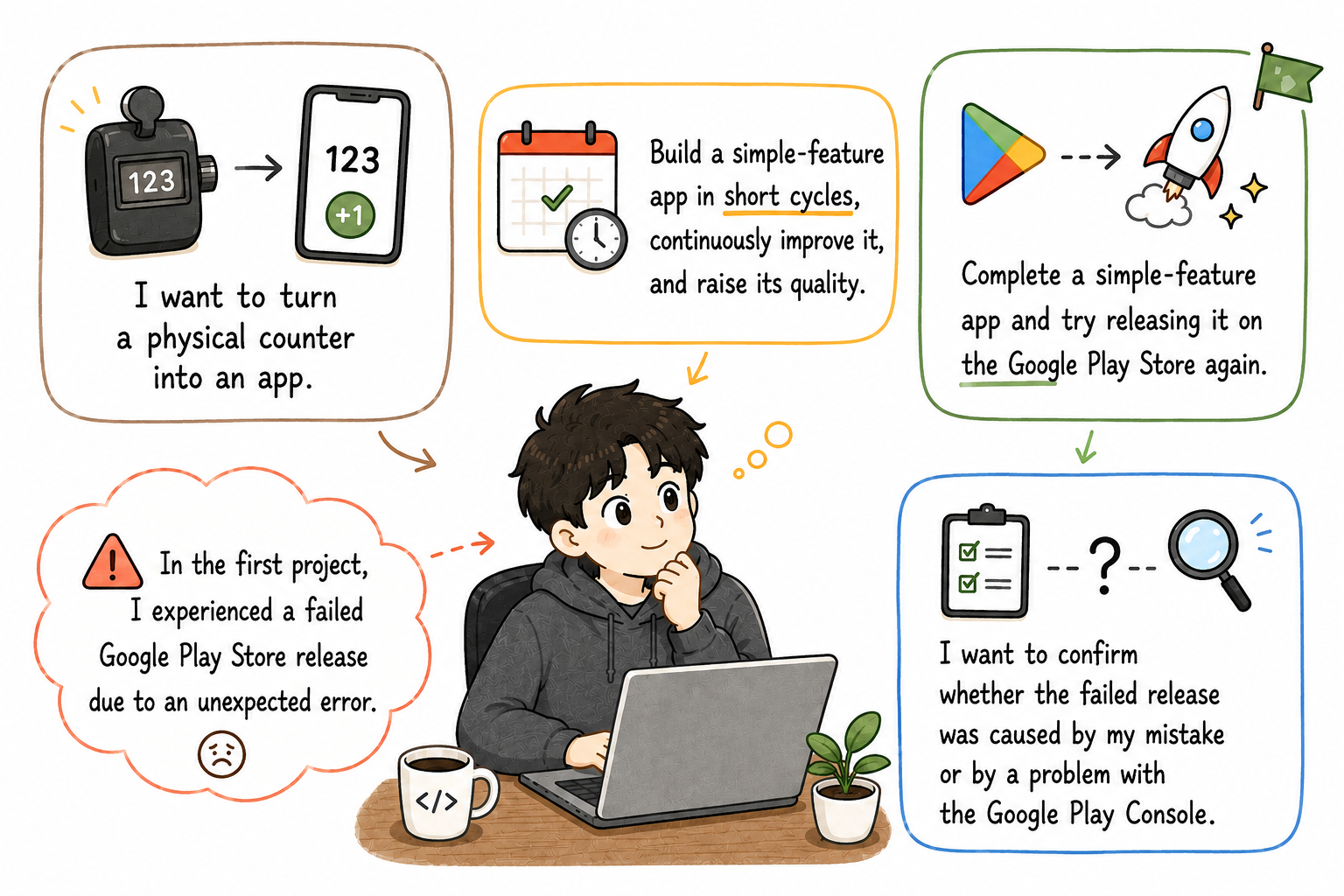
"CheerUp Mini", my first project, was created to experience Flutter app development and store release. However, during the Google Play Store production release process, the issue "An unexpected error occurred" repeatedly appeared.
I needed to determine whether this was a problem with the entire developer account or an issue limited to the Play Console status of a specific app. For that reason, I decided to create a second app with a smaller feature scope and check whether another app could be released normally on the Google Play Store using the same account.
The reason I chose a tally counter app was clear. Since the feature itself was simple, I could focus more on development, release, review, and ad implementation rather than service planning. Instead of adding complex server features, login, or payment functionality, the core goal of this project was to complete an app within a short period and publish it on an actual store.
The goals of this project were as follows.
Goal
Reason
Validate a short development cycle
To check whether I could quickly complete a simpler app based on the development experience gained from the first app
Recheck Google Play Store release
To verify whether the production release error from the first app would also occur in another app
Background and Goal
Key Features
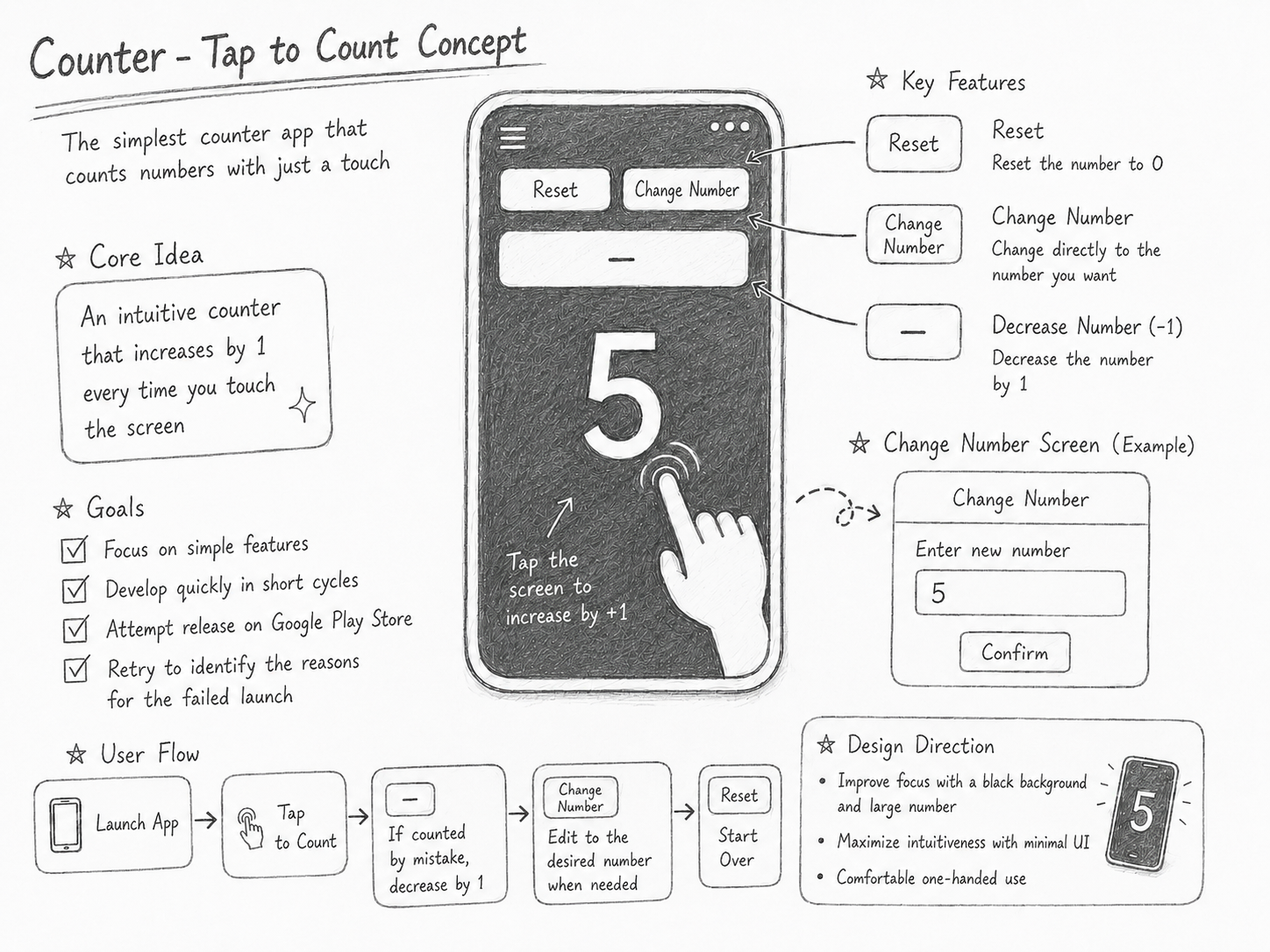
Increase number
The current number increases by 1 when the user touches the screen
Decrease number
The current number decreases by 1 using the decrease button
Reset number
Resets the current number to 0
Manual number change
Allows the user to directly enter a desired number and update the current value
Variable text size
Adjusts the text size so the number remains naturally visible within the screen even as the number of digits increases
In-app ads
Ads through Google AdMob
Development
Setting the Development Goal
The goal of "TallyCounter — Tap to Count" was to develop a simple-feature app within a short period and verify the full process through an actual store release.
Since I aimed to complete both development and release within one month, I intentionally kept the feature scope small. Rather than adding complex extra features, I focused on the core function of a tally counter: counting and changing numbers.
This approach was an attempt to repeatedly build small apps quickly and release them to real users. Instead of trying to create a large, polished app all at once, I focused on making something small, publishing it, and directly experiencing the development, deployment, and operation process.
Concept for TallyCounter — Tap to Count
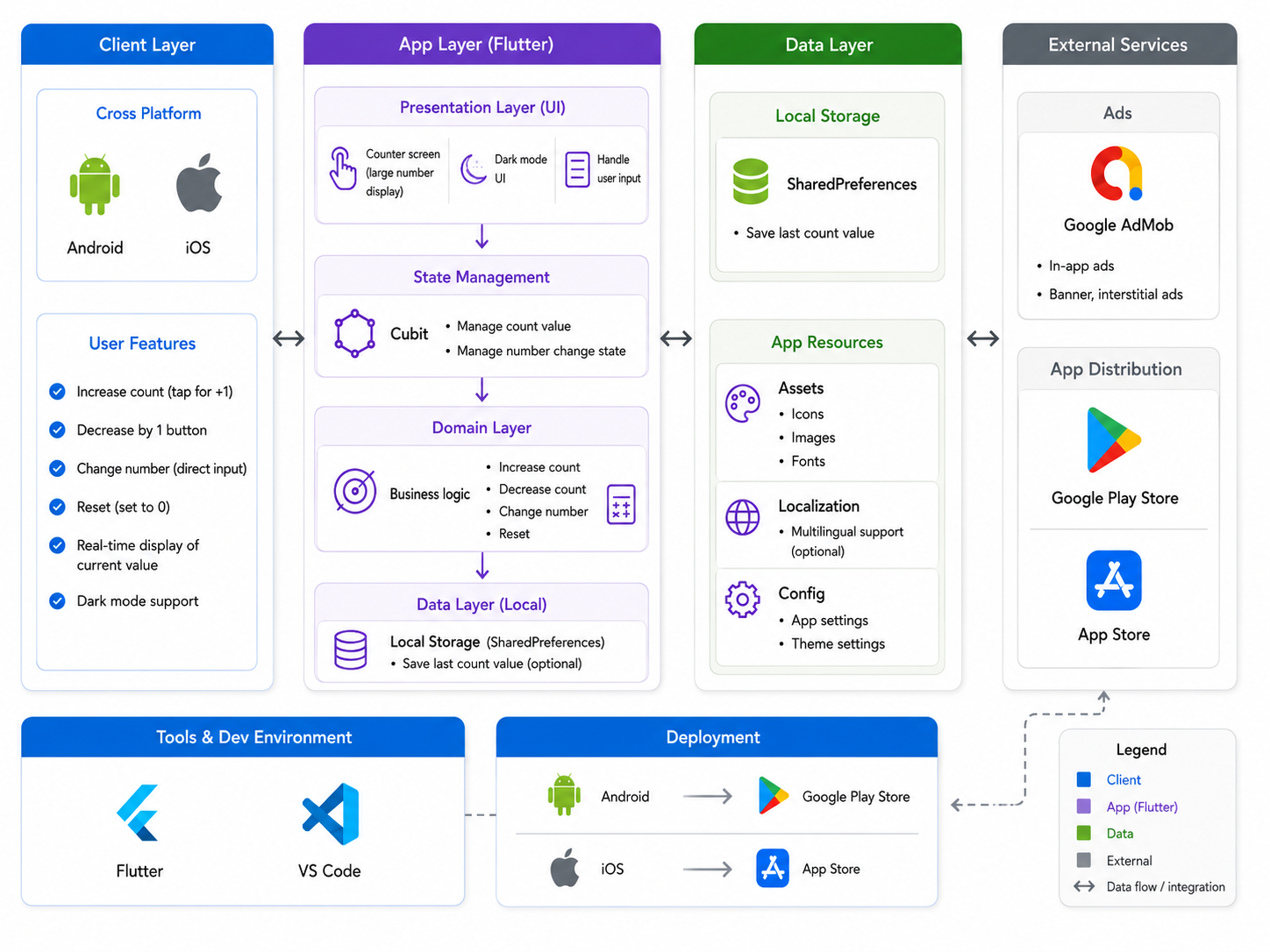
System Architecture
"TallyCounter — Tap to Count" is a mobile app that operates without a separate server. It manages the user’s touch input as internal app state and immediately reflects the updated number on the screen.
Component
Role
Screen UI
Displays the current number and provides increase, decrease, reset, and manual change functions
Touch input handling
Detects screen tap events and increases the number
Number decrease handling
Detects decrease button events and decreases the number
Number reset handling
Detects reset button events and changes the number to 0
Number input handling
Reflects a user-entered number as the current count value
Text size adjustment logic
Adjusts the text size so the number remains naturally visible within the screen even as the number of digits increases
Ad module
Connects Google AdMob ad units and displays ads within the app
System Architecture Diagram
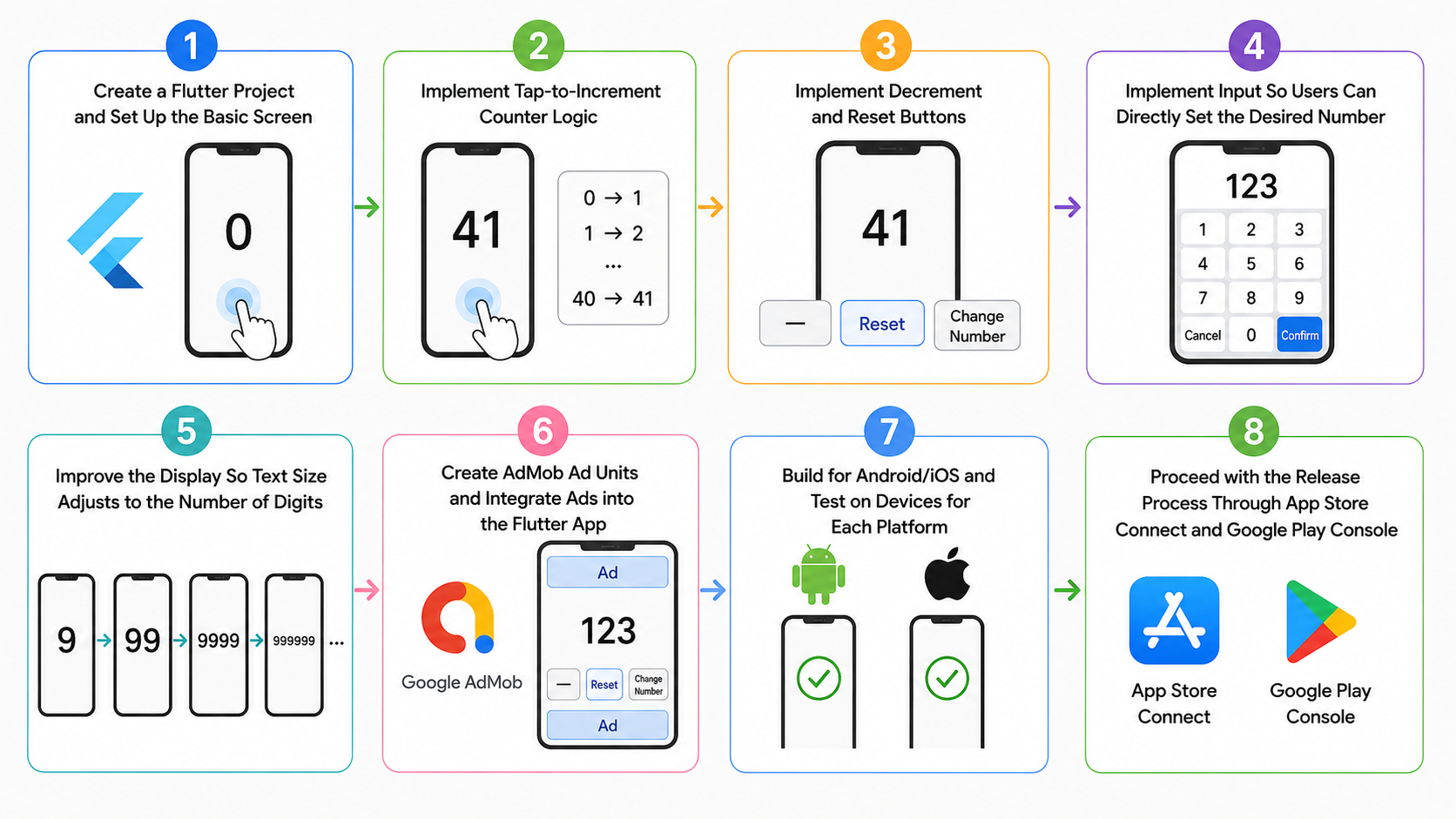
Core Implementation Flow
Implementation Flow
Store Deployment Process and Issue Handling
"TallyCounter — Tap to Count" was developed with the goal of releasing it on both the Google Play Store and the Apple App Store.
The Google Play Store release was the most important validation point in this project. Since the production release request for my first project, "CheerUp Mini", repeatedly failed with an error, I needed to confirm whether another app could be released normally from the same developer account.
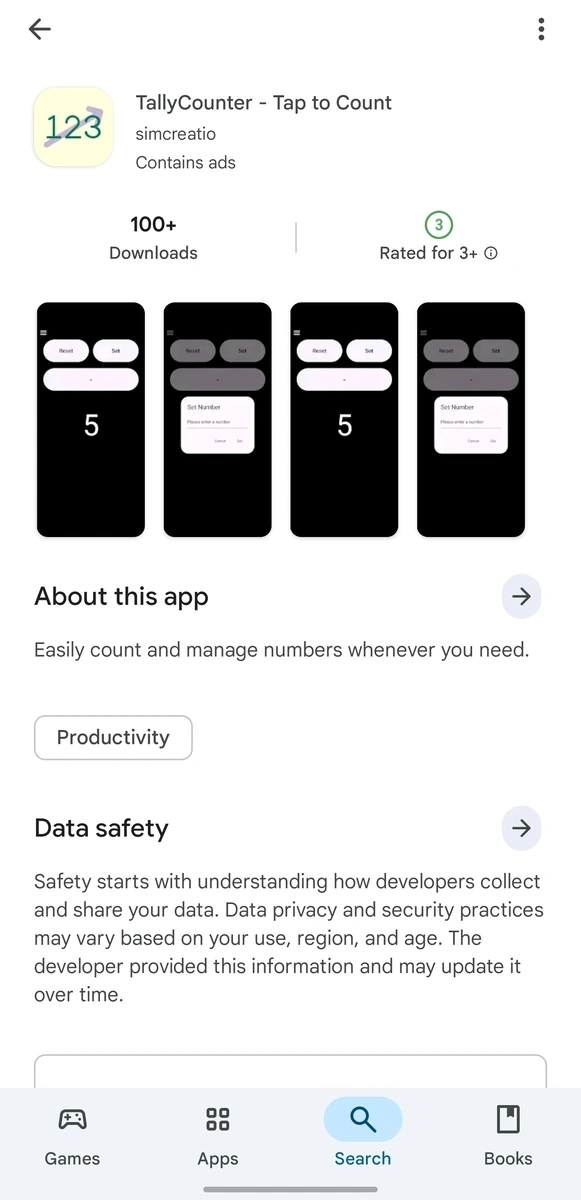
As a result, "TallyCounter — Tap to Count" was successfully released on the Google Play Store. This allowed me to narrow down the cause and conclude that the Google Play production release issue from "CheerUp Mini" was likely not a problem with the entire developer account, but rather an issue related to the Play Console status or production release process of that specific app.
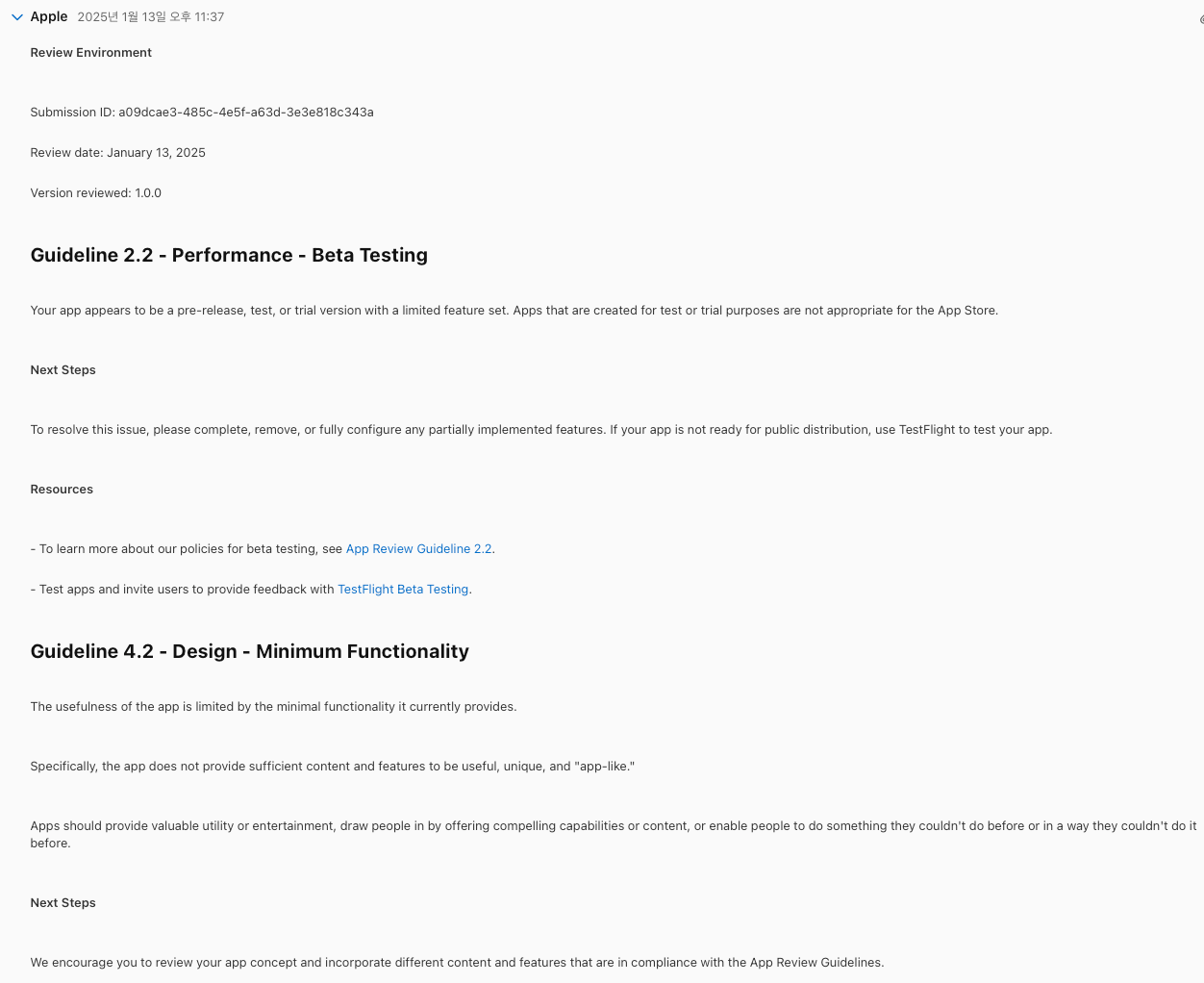
On the other hand, I was not able to release it on the Apple App Store. At first, there was an issue related to test ad exposure, and later, the main problem was that the app’s functionality was too simple. Section 4.2, Minimum Functionality, of the Apple App Review Guidelines states that an app should be sufficiently useful, unique, or app-like, and that apps failing to provide this may not be suitable for the App Store [Apple Developer - App Review Guidelines].
Through this experience, I confirmed that review standards can differ from store to store even for the same app. While the app could be released on the Google Play Store as a simple tally counter tool, the Apple App Store required a more complete app-like experience beyond a simple function.
Screen released on Google's Play StoreImage showing the Apple App Store review rejection
Achievements
Develop within a short development cycle of under one month
Success
Google Play Store release
Success
Check whether "CheerUp Mini"’s Google Play release error could be reproduced
Success
Apple App Store release
Failure
The purpose of this project was not to build a large-scale service, but to complete an app within a short development cycle and verify whether it could actually be released on a store. Based on that standard, this project achieved most of its goals.
The most important result was the Google Play Store release. I needed to check whether the production release error from the first project would also occur in another app, and the same issue did not occur with the tally counter app. This helped narrow down the scope of the problem.
Another meaningful result was experiencing a fast development cycle. Because the feature scope was kept small, I was able to complete core feature implementation, device testing, and store registration within a short period. This experience helped confirm the feasibility of building and releasing small apps quickly in future projects.
Although the Apple App Store release failed, that failure still provided meaningful learning. I learned that even simple utility apps can be evaluated differently depending on the store, and that the App Store in particular requires enough app-like experience beyond a simple function.
Learnings from the Project
"TallyCounter — Tap to Count" was not a functionally complex app, but it helped me understand the standards required when actually releasing a small app. I learned that store policies must also be considered as part of the development and release process.
Future projects should not rely only on simple functionality; they should also strengthen the app-like experience. In particular, since Google Play and the App Store may apply different review perspectives, each store’s policies and guidelines need to be reviewed separately before release.